Friday, 11 November 2016

Add Button to Chart Toolbar - NinjaTrader 8

NinjaTrader Educational Resourses details an Indicator / script that adds a button with a background image to the toolbar of the chart window. These buttons can be useful to trigger custom blocks of code in NinjaTrader 8 Indicators and Strategies.

The original script can be found on the NinjaTrader 8 Support Forum
using_bitmapimage_objects_with_buttons.htm

demoToolBarButton.cs 
For demonstration, this NinjaTrader 8 Indicator loads a button (but excludes the bitmap) and assigns a Click event. This event simply toggles the printing of the Instrument Name and Description on to the chart.

This is a convenient solution to add custom button functionality to a NinjaTrader 8 Chart. (without the need to impliment WPF)


NinjaTrader 8 - Demo Tool Bar Button
Download the NinjaScript code 
demoToolBarButton.cs


Friday, 4 November 2016

Display Chart Instrument/Symbol Name in Large Letters - NinjaTrader 8

Append this NinjaScript Draw.TextFixed function to the code block:


Instrument Name Label. 6S (Swiss Franc Futures) 


Adjust the font, size, colors and alignment parameters as required. Use this line of NinjaScript code in any NinjaTrader 8 Indicator or Strategy.

NinjaScript > Language Reference > Common > Drawing
Draw.TextFixed : https://ninjatrader.com/support/helpGuides/nt8/en-us/?draw_textfixed.htm


Instrument.MasterInstrument.Name returns the Instrument Name 6S property as shown above

There are a number of other properties in the namespace Instrument.MasterInstrument including:
Instrument.MasterInstrument.Currency, Description and InstrumentType.

NinjaScript > Language Reference ...
Instrument.MasterInstrument : https://ninjatrader.com/support/helpGuides/nt8/en-us/?masterinstrument.htm

Monday, 5 September 2016

NinjaTrader 8 - How to change the skin colors

A new installation of NinjaTrader 8 has the "Slate Gray" skin set by default.

1) Open NinjaTrader 8. From the Toolbar

Click on: Tools > Options


2) In the "General" Category

Goto: General > Properties > Preference > Skin
Select a skin type from the dropdown list.
Click OK


3) Restart Required

Click OK


4) Start NinjaTrader 8

Start NinjaTrader to see the skin change take effect. This is the "Light" Skin.


Thursday, 25 February 2016

DeltaBars Indicator for NinjaTrader 7

What is Volume Delta?
Volume delta is the difference between the total of the bid and ask traded volume.

What is the DeltaBars Indicator?
The DeltaBars Indicator for NinjaTrader 7 takes the delta value and modifies the bar color accordingly. Positive DeltaBars are printed in blue and negative DeltaBars are printed in red; Delta values for each bar are printed alongside. Cumulative volume delta values for Bid/Ask (red/blue) and Total (black) are plotted at the footer of the chart.


How it is calculated?
Positive Delta
The ES S&P emini traded 200 contacts at the offer and 100 contracts traded at the bid, this means that there is a "positive delta" of 100 hundred contracts. Delta Value: 200 (positive)

Negative Delta
The ES S&P emini traded 100 contacts at the offer and 200 contracts traded at the bid, this means that there is a "negative delta" of 100 hundred contracts. Delta Value: -100

This "Delta Value" is calculated as either a positive or negative value. This value can then be displayed on each bar; and depending if the delta is positive or negative, then modifiying the bar color accordingly.

What are DeltaBars good for?
The resulting graphical representation of this data could be useful in deturmining the bias of the order flow at that moment. Be aware that an "up bar", (one which closes higer than it opened and usually represented in green) would in fact be displayed in red should there be a negative delta. An up bar displayed in blue for example means that the delta is positive and the price move was in accordance with the order flow.

User Configurable Parameters: 


Notes:
* Pressing F5 will refresh the chart and ALL the delta values.
* DeltaBars does not consume historical volume data. Only data from a live datafeed will be processed and printed on screen.
* This indicator works on any time period.

Installing this indicator:
1) Download the indicator from the link below.
    (Note: on Google Docs page, click the Download Icon - Top Center)
2) Save the zip file to a convenient location on your PC.
3) In the NinjaTrader 7 Control Center, click File >> Utilities >> Import NinjaScript...
4) Select the zip file, and import it in to NinjaTrader. 

Download / Indicator Info

    FileName: A1DeltaBars.zip << Download Link
    Version: 1.0.0
    Type: NinjaTrader 7 Indicator
    Copyright: N.Martin (c) Feb 2016
    Website: http://nigel-forex.blogspot.co.uk/
   
    -- Version 1.0.0
    * Create Dictionary Look up for: barBidVolume, barAskVolume,
       totalBidVolume, totalAskVolume, totalVolume.
    * Change Bar Colors based on delta value
    * Print Delta Value per bar
    * Print Cumulative Volume for Bid, Ask and Total
  
    -- Version 1.0.1 Proposed
    * The Delta value printed on each bar needs to be text centered.

Friday, 19 February 2016

NinjaTrader 7 - Volume Profile - Modified Volume Zones Indicator

"Volume Zones" is a default indicator included with NinjaTrader 7 and is used to analyse and display volume data as a "profile".

This indicator only displays volume bars for the price bars that are on the chart, meaning you can quicky rescale or scroll the chart, to show volume profile for a specific time period on the chart; and most importantly the ability to handle historic and incoming volume data.

My only issue with this indicator is that it is left aligned. In order for me to utilise this indicator, i needed to see the profile displayed on the right hand side of the chart; and further to that, the actual volume bars are too "low resolution"


Changes
After making a few tweaks to the code, the volume profile is now plotted on the right hand side of the chart and the resolution is increased from 20 to 60 rows. To enable easier identification of high and low volume nodes, i also added a black line profile. 


The white background and black outline of the profile "spikes" make it easier to identify the HVNs and LVNs. (compared to the blue version below)


I am providing this script in its "beta" form and for educational purposes only - "as is" with no warranty. I may continue to improve this script and release further versions in future.

Download / Indicator Info

    FileName: A1VolumeProfile.cs
    Version: 1.0
    Type: NinjaTrader 7 Indicator
    Copyright: N.Martin (c) Feb 2016
    Website: http://nigel-forex.blogspot.co.uk/

    File Download URL:
    https://drive.google.com/file/d/0BzwRDK7g5KnfODE0VlZERWN1VlE/view?usp=sharing

    -- Version 1.00
    * Plot volume profile on the right hand side of the chart
    * Increased the resolution from 20 to 60. To enable easier identification of high and low nodes,
    * Added Black profile outline - has minor bug where last plot data point 'falls off the screen'
   
    -- Version 1.1 Proposed
    Plot horizontal lines on high and low volume nodes.
    ShowHVN true | false
    ShowLVN true | false
    HVNcolor [color]
    LVNcolor [color]
    NumVolNodes int    

    Increase the "resolution" to allow for one volume bar per pip.  
    Provide option to plot micro composite volume profiles on each session.   
    Provide option to plot user defined micro composite volume profiles

FX-PriceBoard - MT5 Indicator


In a previous post FX-PriceBoard - MT4 Indicator I created an indicator that would display an up todate overview of the markets as a price board. There was some interest in this indicator, however i believe that the "licence" i wrote in to the software expired some years ago.

So, to keep up with the times, I am currently re-writing the "FX-PriceBoard for MetaTrader 5"  this will provide the same features as before, including the addition where the price comparison is based up the current charts timeframe. Also, with the advent of wider PC monitors, the FX-PriceBoard has been adapted to display each Currency Group in it own column, giving a sleeker appearance than before.

For example, if you are looking at the M5 chart, then the strength and weakness of a specific currency group is based on the whether the current price is above or below the previous 5 minute periods price.

FX-PriceBoard is not intended as a "Trading System" and is an indicaor only, however, for example, by observing the short term H1 vs longer term D1 strength / weakness could help to gauge the overall bias of particular currency groups.

The following screenshot shows the GBPAUD H1. The Price Board shows clears strength in the AUD group and some weakness in the GBP group. Taking note that the base currency for this chart is GBP ie GBPAUD it is possible that there could be a downturn in price once again, inline with the trend and moving averages.


Other Asset Groups
Although this indicator is call FX-PriceBoard, a number of brokers who provide MT5 include Indices and Futures prices with their data feeds, i am intending to incorporate that data as well, alternatively an "Auto" option would be preferable, where the MT5 platform is queried for available symbols and then the data is rendered in to the appropriate groups.

Release Date and Availability
This is currently a work in progress, I am targeting for mid 2016 to release this. 
I am intending to release FX-PriceBoard indicator via the MetaQuote market place at
https://www.mql5.com/en/market/mt5

Interested in this Indicator?
Thanks to those who have shown an interest in the FX-PriceBoard for MT4 version, I do not have any immediate plans to re-release this indicator at this time, however, if this MT5 version is popular then i shall look at re-releasing MT4 again.

If you have any suggestions for features to be included in this Price Board, then please comment below; or ping me an email maxdecimus88 at gmail com and i will update you once there are any updates / release dates.


Ideas For User Options, Features and Improvements


 To add to this list

* Display: Price | Price Change Pips | Price Change %

* Text color selection
* Text size selection
* Text font selection
* Color Scheme: Yellow on Black | Yellow on Green | Black on White   

* AutoDisplaySize - Render the priceboard based on the chart height and width, giving a "responsive design" Then it may be suitable for 50" Flat Screens? |

Thoughts
I have detailed some ideas below, however, upon reflection, i think the Price Board would be best doing just that - Displaying Prices / Changes. The Volume and strength meter mentioned below maybe best saved for another indicator.

Volume / Depth of Market / Order Book
Dependent on the Volume, Depth of Market and Time&Sales data available from MT5, It may be possible to provide options to display the "Price Board" info based on: Price or Volume / Order Book data.

Strength Meter / Value
An over all strength could be displayed at the footer of each currency group column. However additional pairs would have to included in each list to ensure the weighting is correct for each group. For example, Comparing the USD group to the CHF group at this time would inaccurate as there are 8 currency pairs listed for USD and only 1 for CHF. To ensure correct weigting and comparison, all group would have to contain their equal and opposite pair; (and this may only lend itself to the majors)  I have created other currency strength indicators before that take this in to account.

more updates to follow...

Sunday, 2 August 2015

Cannot ping MetaTrader Trading Server - ping n/a

The Problem 
Having come across the dreaded "n/a" when attempting to ping a trading server; I found myself getting somewhat frustrated to say the least that i could not connect.

I had set up a fresh instance of an Amazon AWS Windows 2012 Server to use as a VPS. I then proceeded to install a fresh copy of MetaTrader 5 from MIG Bank / Swiss Quotes. The installation was complete and i was ready to use an existing demo account to login with.

Thats when the problems started. I clicked File > Login to trading account. And the terminal was just hanging, with the dreaded n/a shown in the ping column. This is a problem i saw ages ago with MetaTrader 4. In my wisdom, i thought i'd simply create a new demo account from File > Open an Account

Knowing the "Open an Account" dialog would allow me to (force) ping the sever in question, thus getting me back on track - Wrong! I was faced with the same issue again - n/a - aggghhhh !

Having ensured the firewall was allowing the MetaTrader application access to the network i was again left wondering why on earth i could not connect. Using the default server name i thought i'd be clever and enter that same address in to the field "Add a new broker like 'BrokerName' or address mt.company.com:443" - This achieved the same result - nothing.

More head scratching followed; and with that niggling feeling that a port was being blocked. I checked the settings in the AWS console. In particular "EC2 Dashboard" > "Security Groups" and selected the web server security group that i had previously setup. This was allowing http on port 80 both incoming and outgoing, all good, what now?

The Solution
Thats when a moment of clarity hit me that the trading server wants to "talk" over port 443... ah ha. So i proceeded to setup a "custom tcp rule" (in AWS console > EC2 > Security Groups) and specified port 443 for incoming and outgoing traffic.

Upon returning to MetaTrader 5, i again clicked File > Open an Account and sure enough the dialog showed the ping at 45.49ms which then allowed me to proceed with setting up an account.

I know metaquotes have browsed my blog before, so if you are reading this, then maybe another "if else" is required in the code to trap if the MetaTrader application cannot connect via port 443?
That'd be quite useful.

Aparently "The answer to the ultimate question of life, the universe and everything is 42" - In this case it the answer was port 443 ! 

Anyway, i hope this info may help others stuck in the same position.

Provider Info:
Amazon AWS - https://aws.amazon.com/ec2/
MetaQuotes MetaTrader 5 - http://www.metaquotes.net/
Broker: MIG Bank / Swiss Quotes  - http://www.swissquote.ch

Sunday, 2 February 2014

Create Your Own Graphical Panels in MQL5 AND MQL4

Metaquotes have upgraded the popular Forex Trading Platform MetaTrader MT4. Build 574 is now compatiable with the MQL5 language which initially offeres enriched OOP functionailty.

This means you can now develop Expert Advisors and Indicators for MT4 using the classes available in Include\Controls to create custom control panels and dialogs.

Example #include <Controls\Panel.mqh>

The MetaEditor application has been overhauled to allow MQL4 and MQL5 development and debugging.
Other additions for MT4 programmers include line numbers, full debugging, predictave typing for function names and variables. 
(MetaEditor 5.00 Build 882 19th Dec 2013)  

MetaQuotes have published a very useful example and walkthrough of the example panel. Although the article is titled "Create Your Own Graphical Panels in MQL5" the code example provided builds and runs fine in MT4 with no debugging required.

For an experienced programmer in MT4 with little exposure to MQL5, these examples provide a perfect place to get started with the additional classes and functionality that is now available for MT4.


A further Panel Example is already loaded in the MT4 platform under:
Navigator >> Custom Indicators >> Examples >> SimplePanel >> SimplePanel


Attach "SimplePanel" to a chart >>


This has apparently been released as a beta at this time, however some forum posters reported this build was being used for live accounts as well. It appears to be very stable.

So it looks like i will have to eat my hat MetaQuotes as my previous rant about MQL5 in my post "MetaTrader MT5 - Pros and Cons" said:

"If MT5 was a true upgrade from MT4, retaining the existing features then that would be great. I wont hold my breath for this to happen though."

Having not expected any further changes to happen with MT4, I have to say i am pleased MetaQuotes chose this upgrade - So... Top Job, Great work MetaQuotes ! Well done !!


Wednesday, 31 August 2011

FX-PriceBoard - MT4 Indicator

This is a Forex Price Quotes Board - MetaTrader MT4 Indicator

Get an overview of where the strength and weakness lies in the individual currencies.

Forex Price Board displaysReal Time
  • Forex Exchange Rates 
  • Metal Prices
  • Futures
  • Indices

Once the code is finalised it will be released here as an ex4 download
Also see: http://nigel-forex.blogspot.co.uk/2016/02/fx-priceboard-mt5-indicator.html


Tuesday, 23 August 2011

FX-Invaders - MT4 Indicator

To give you an idea of the flexability of MT4, text and label object can be drawn or plotted progmatically, during an episode of insanity i created a MT4 Indicator called FX-Invaders... This gives you an idea of what can be done with MQL4.

Although i had not completed this script it was fun to watch Invaders swarm around a particular currency launching a bombardment... showing that particular currency to be weak. Once i have some free time i may finish this script and publish it here on my Nigel Forex Blog :)

I was having some fun with this, including the function names... I had to laugh at this one:
ExecuteSaucerAttack("CHF", "USD", "heavy", 5);

FX-Invaders (c)2010 Nigel Martin

Algo Trading - TedTalks

I recently watched an excellent TEDGlobal talk by Kevin Slavin - He is an algorithm expert from the USA.

It appears that the algorithms responsible for Amazons pricing model went mad and decided that a book - "The Making of a Fly" had a fair value of $1.7m this later increased to $23.6 million plus shipping and handling!

Kevin talks about the "Flash Crash of 2.45" where 9% was wiped off the Dow. This phenomenon occured due to automated algorithmic trading.

It is said that 70% of the trading on the US stock market is based on algorithmic trading. It is for that reason i concentrate my efforts on Automated Forex Trading Systems.

Kevin Slavin: How algorithms shape our world 

http://www.youtube.com/watch?v=TDaFwnOiKVE


Comments welcome !

FX Order Info - MT4 Indicator

Download FX Order Info Indicator for MetaTrader 4 - Features

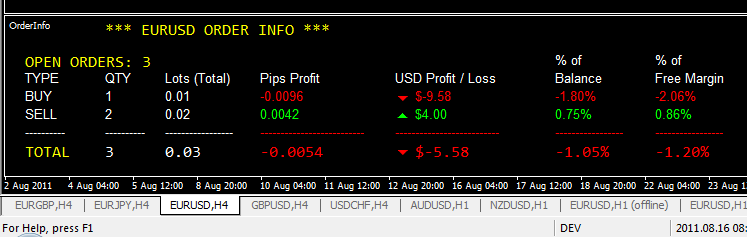
Order Info provides you with an overview of  
BUY or SELL, CURRENT or PENDING Orders
on a single currency pair.

See your Grid Trades and Multi Order Positions at a glance 


FX Order Info Displays Real Time:
  • Order Quantity
  • Number of Lots
  • Total Pips Profit
  • Total Money Profit
  • % of Balance (per position)
  • % of Free Margin (per position)


Download
Version: 1.0
Release Date: SEPT 2011

FX OrderInfo-v1.0.ex4


Release Notes
Only tested on Demo Account with MetaTrader 4 - Alpari Version 4.00 Build 402
Coded to handle 2, 3,4 and 5 Digit Brokers - To be tested  
 
Bugs List / Criticisms
Only works with black background
Not tested with (example) EURUSDm Symbol Names
FX-OrderInfo must be the first Indicator attached to chart

Bugs Fixed List
n/a

Future Improvements
  • Do look up on AccountCurrency and convert to ₣ £ $ € ¥
  • Provide alternative color scheme for non black backgrounds
  • "FX-OrderInfo must be the first Indicator attached to chart"
    - Allow indicator to work in any subwindow
  • MetaTrader 5 Version
Documentation
TBA

Licence
Expires: End 2012
Free Version works with Demo Account Only
Live Account KEY available on request $20
Software supplied as is with no warranty
Software (c)2011 Nigel Martin

Source Code
Price on Application

Purchase
This Version is FREE


Monday, 22 August 2011

GridTraderPro - In Development. $1m - $19m in 25 Trades

Here is a sample of my GridTraderPro EA that i have been developing over the last few months. The returns are sky high as is the risk and the drawdowns. At this time i am not prepared to release the souce code to all and sundry. however should you be able to make a major contribution to this work then i may release the source code on an individual basis.

I do intent to publish as much detail as i can, thus prompting constructive discussion.

This "Strategy Tester Report" shows GridTraderPro on the EURUSD producing some quite respectable returns over a 2 month period. It has to be remembered that this is cherry picked to show what can happen. Similarly $1m can turn in to ZERO in just a few trades. The MaxRiskPerTrade is set to 25% of free margin - which in my opinion is insane, tweaking it down to say 10% (or less) could be a more reasonable risk factor.

GridTraderPro

GridTraderPro - $1 million > $19 million in 2 months

MQL4 Trailing Stop and Exit

The standard MT4 Platform is usually supplied with an example Expert Advisor called "Moving Average.mq4" Within this script is a function called CheckForClose() This function can be expaned upon to deal with trailing stops &/or exits. This particlar code block uses the Magic number parameter to select the correct order. Just call the function TrailingStops() from within the start loop.
 #define MAGIC 20110725  
 // or get this from  
 // extern int EA_Unique_No = 444888;  
 extern int TrailingStop = 400; // as in 40 pips for 5 Digit broker

 //+------------------------------------------------------------------+  
 //| Check for Exits / Trailing Stops                |  
 //+------------------------------------------------------------------+  
 void TrailingStop()  
 {  
   //---- go trading only for first tiks of new bar  
   if(Volume[0]>1) return;  
   //----  
   for(int i=0;i<OrdersTotal();i++)  
   {  
    if(OrderSelect(i,SELECT_BY_POS,MODE_TRADES)==false)    break;  
    if(OrderMagicNumber()!=MAGICMA || OrderSymbol()!=Symbol()) continue;  
    //---- check order type  
    if(OrderType()==OP_BUY)  
    {  
      // orig  
      //if(Open[1]>ma && Close[1]<ma) OrderClose(OrderTicket(),OrderLots(),Bid,3,White);  
      //break;  
      // Check for trailing stop  
      if(TrailingStop > 0)  
      {  
       if(Bid-OrderOpenPrice() > Point*TrailingStop)  
       {  
         if(OrderStopLoss() < Bid-Point*TrailingStop)  
         {  
          OrderModify(OrderTicket(),OrderOpenPrice(),Bid-Point*TrailingStop,OrderTakeProfit(),0,Green);  
          return(0);  
         }  
       }  
      }  
    } // /if buy  
    if(OrderType()==OP_SELL)  
    {  
      // Check for trailing stop  
      if(TrailingStop > 0)  
      {  
       if((OrderOpenPrice()-Ask) > (Point*TrailingStop))  
       {  
         if((OrderStopLoss() > (Ask+Point*TrailingStop)) || (OrderStopLoss()==0))  
         {  
          OrderModify(OrderTicket(),OrderOpenPrice(),Ask+Point*TrailingStop,OrderTakeProfit(),0,Red);  
          return(0);  
         }  
       }  
      }       
    }  
   }  
   //----  
 }  

MQL4 Magic Number Provision

This include script assigns a preset magic number to an EA, it can be useful during development as it means you you dont have to manually reassign the magic number to the EA every time you recompile it.

I placed all this code in an include file called "Inc_AssignMagic.mq4" and then referenced it in my EA using the directive: #include <Inc_AssignMagic.mqh>


From OrderSend you can call the function AssignMagic(Symbol()) to populate the magic number for the order. Please note this is not suitable for multiple time frames, but could be easy adapted.

//+------------------------------------------------------------------+
//|                                              Inc_AssignMagic.mqh |
//|                               Copyright © Jul 2011, Nigel Martin |
//|                                  http://nigel-forex.blogspot.com |
//+------------------------------------------------------------------+
//#property copyright "©2011, Nigel Martin"
//#property link      "http://nigex-forex.blogspot.com"

// Version 1.0

//+------------------------------------------------------------------+
//| Return Magic Number                                              |
//+------------------------------------------------------------------+

 int AssignMagic(string symbol)
 {
    // AUD
    if(symbol == "AUDCAD") { return(111111); }
    if(symbol == "AUDJPY") { return(111222); }
    if(symbol == "AUDNZD") { return(111333); }
    if(symbol == "AUDUSD") { return(111444); }

    // CAD
    if(symbol == "CADJPY") { return(333111); }
  
    // CHF
    if(symbol == "CHFJPY") { return(333222); }
  
    // EUR
    if(symbol == "EURAUD") { return(555111); }
    if(symbol == "EURCAD") { return(555222); }
    if(symbol == "EURCHF") { return(555333); }
    if(symbol == "EURGBP") { return(555444); }
    if(symbol == "EURJPY") { return(555555); }
    if(symbol == "EURUSD") { return(555666); }
  
    // GBP
    if(symbol == "GBPCHF") { return(777111); }
    if(symbol == "GBPJPY") { return(777222); }
    if(symbol == "GBPUSD") { return(777222); }

    // JPY
  
    // NZD
    if(symbol == "NZDUSD") { return(014111); }

    // USD
    if(symbol == "USDCAD") { return(021111); }
    if(symbol == "USDCHF") { return(021222); }
    if(symbol == "USDJPY") { return(021333); }
  
    return(0);       
 }

Formatting Source code for your Blog - MQL4 MQL5 ASP PHP CSS JavaScript HTML ASP.Net C# VB.Net Visual Basic

Here is a very useful Source Code Formatter which is very handy if you write a blog Its great, there are no need for hosted css files or anything ... Just copy your source code in the box ... press the go button and then copy out the formatted html ... brilliant !

http://codeformatter.blogspot.com/2009/06/about-code-formatter.html

Here is an example

 //+------------------------------------------------------------------+ 
//| Calculate open positions                 
//+------------------------------------------------------------------+ 
int CalculateCurrentOrders(string symbol) 
{ 
  int buys=0,sells=0; 
 
  for(int i=0;i<OrdersTotal();i++) 
   { 
   if(OrderSelect(i,SELECT_BY_POS,MODE_TRADES)==false) break; 
   if(OrderSymbol()==Symbol() && OrderMagicNumber()==MAGIC) 
    { 
     if(OrderType()==OP_BUY) buys++; 
     if(OrderType()==OP_SELL) sells++; 
    } 
   } 
    
  // return orders volume 
  if(buys>0) return(buys); 
  else    return(-sells); 
} 
  

You can configure a number of format settings, however this is the code block i use for this blog:

 
<pre style="background: #f0f0f0; border: 1px dashed #CCCCCC; color: black; font-family: arial; font-size: 12px; height: auto; line-height: 20px; overflow: auto; padding: 0px; text-align: left; width: 99%;"><code style="color: black; word-wrap: normal;"> 
Your Code Block</code></pre> 

Nigel Forex Blog - Welcome

Thanks for dropping by my forex blog ! I have studied technical analysis of Forex Markets for a number of years now; and have come to the realisation that i may as well be flipping a coin (or burgers)

I have coded and backtested numerous automated TA trading systems (MT4) with negative results. Although, I have doubled forex demo accounts in one week using pivot points and also trendline analysis, only to give it all back in half the time. I cannot seem to achieve any consistancy with TA.

Dare i say that TA does in fact work... Thats if the definition of "working" is to blow up your account. Although TA must be a gift from the gods for bucket shops who push it with their "TA 101 Resources and Education" and hundreds of lagging indicators included in their trading platforms ... So i am quite happy with TA, as it probably goes towards ensuring there is fresh supply of new losers entering the market every day.

No doubt i will get flamed for this at some point, i dont care, thats my stance :) 

My focus has turned to Order Management, Risk/Reward and Position Sizing; using Grid Trading techniques. According to many forums and blog posts "The Grid Trade has been done to death" 

- However i am not sure that i can agree with this is as i have been working on the ongoing development of an MT4 Expert Advisor - i have called it GridTraderPro (©2011 Nigel Martin) Through out back tests i have observed a smooth equity curve producing 20x the initial account deposit in just 2 months. $1m become $20m .. Now these are the kind of profits i had been looking for.  

I will be publishing a number of Grid Trading articles and MT4 Scripts that maybe useful to others in their trading. 

Good Trading 
Nigel 


HIGH RISK WARNING & DISCLAIMER: Forex trading carries a high level of risk that may not be suitable for all investors. Leverage creates additional risk and loss exposure. Before you decide to trade foreign exchange, carefully consider your investment objectives, experience level, and risk tolerance. You could lose some or all of your initial investment; 

All the information in Nigel-Forex Blog website is for educational purposes only and is not intended to provide financial advise. Any statements about profit or income, expressed or implied, does not represent a guarantee. Your actual trading may result in losses as no trading system is guaranteed. You accept full responsibilities for your actions, trades, profit and loss; and you agree, not to hold Nigel Forex, its owners and operators responsible for your actions. 

No representation is being made that any account will or is likely to achieve profits or losses similar to those shown. In fact, there are frequently sharp diferences between hypothetical performance results and the actual results subsequently achieved by any trading program. Hypothetical trading does not involve any financial risk and no hypothetical trading record can completely account for the impact of financial risk in actual trading.